
Holoswim 3 Pro Review: GPS Smart Goggles Tested in Pool & Sea
 Karen Parnell
October 26, 2026
Holoswim 3 Pro Review: GPS Smart Goggles Tested in Pool & Sea
Smart goggles, GPS navigation and real-time swimming data without a subscription. But are the Holoswim 3 Pro ready to become your new favourite training partner? I put them to the test in the pool and the sea.
Smart swimming goggles have come a long way. Instead of stopping at the end of every length to check your watch, count your laps or try to remember what your coach asked you to do, you can now see your training data directly in your field of vision.
The Holoswim 3 Pro takes this a step further, offering features for both pool and open-water swimming, GPS navigation and the option to view heart rate when paired with the Holosport HandPlus B2 heart-rate monitor.
As a triathlon coach, I was particularly interested in the open-water features, the ability to customise the display and the recently introduced support for structured swimming workouts.
There's a lot to like, but I've also encountered a few frustrations along the way.
So, let's take a closer look.
If you prefer to listen to Blogs you can listen to it here:
Get your FREE Swim Workouts for Triathletes E-book
First Impressions: They've got the Styling Right
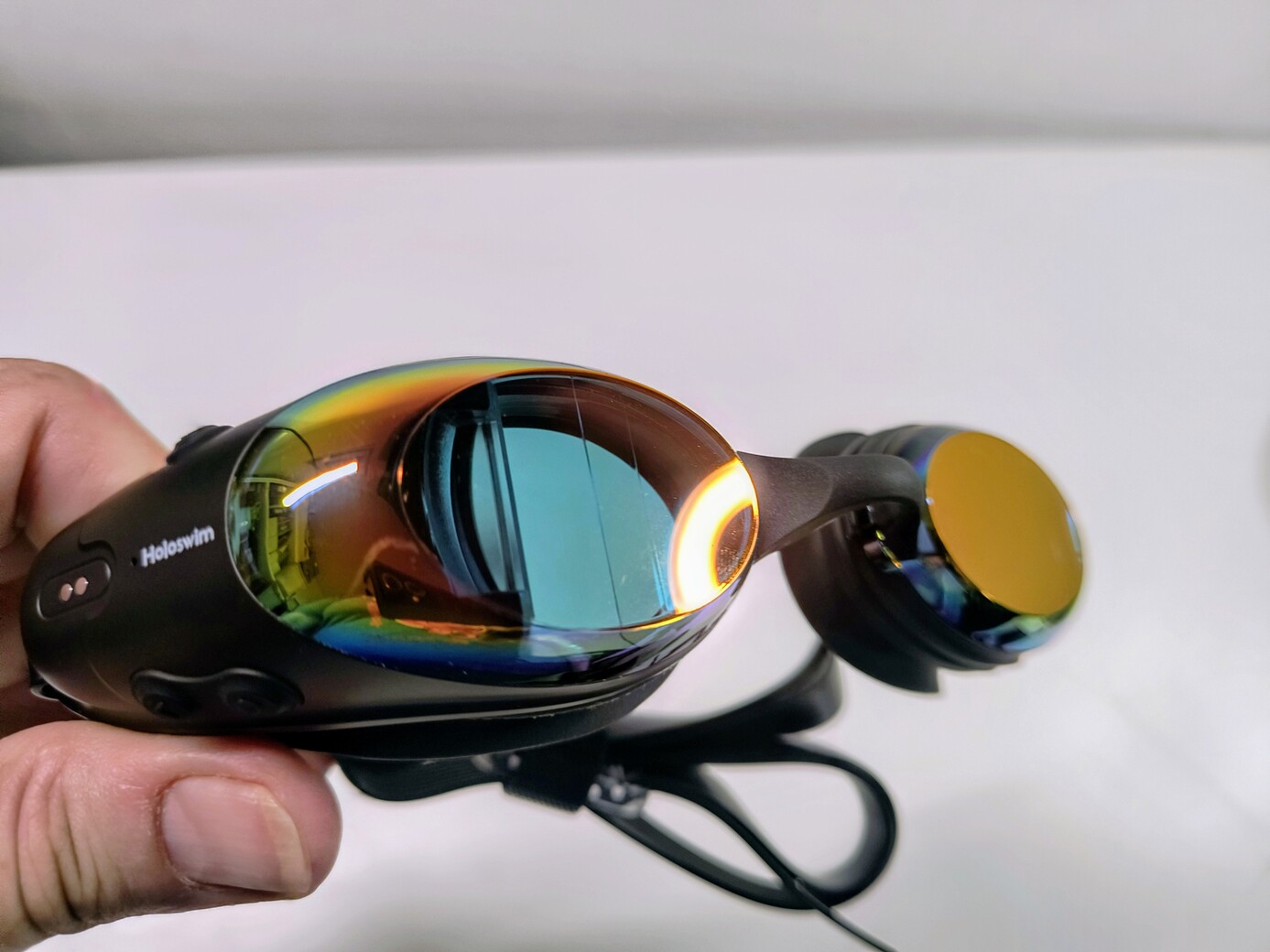
One of the first things I noticed about the Holoswim 3 Pro was the design.
Smart goggles have a bit of a challenge. They need to accommodate the electronics required to display your swimming data without making you look as though you've strapped a small computer to your face.
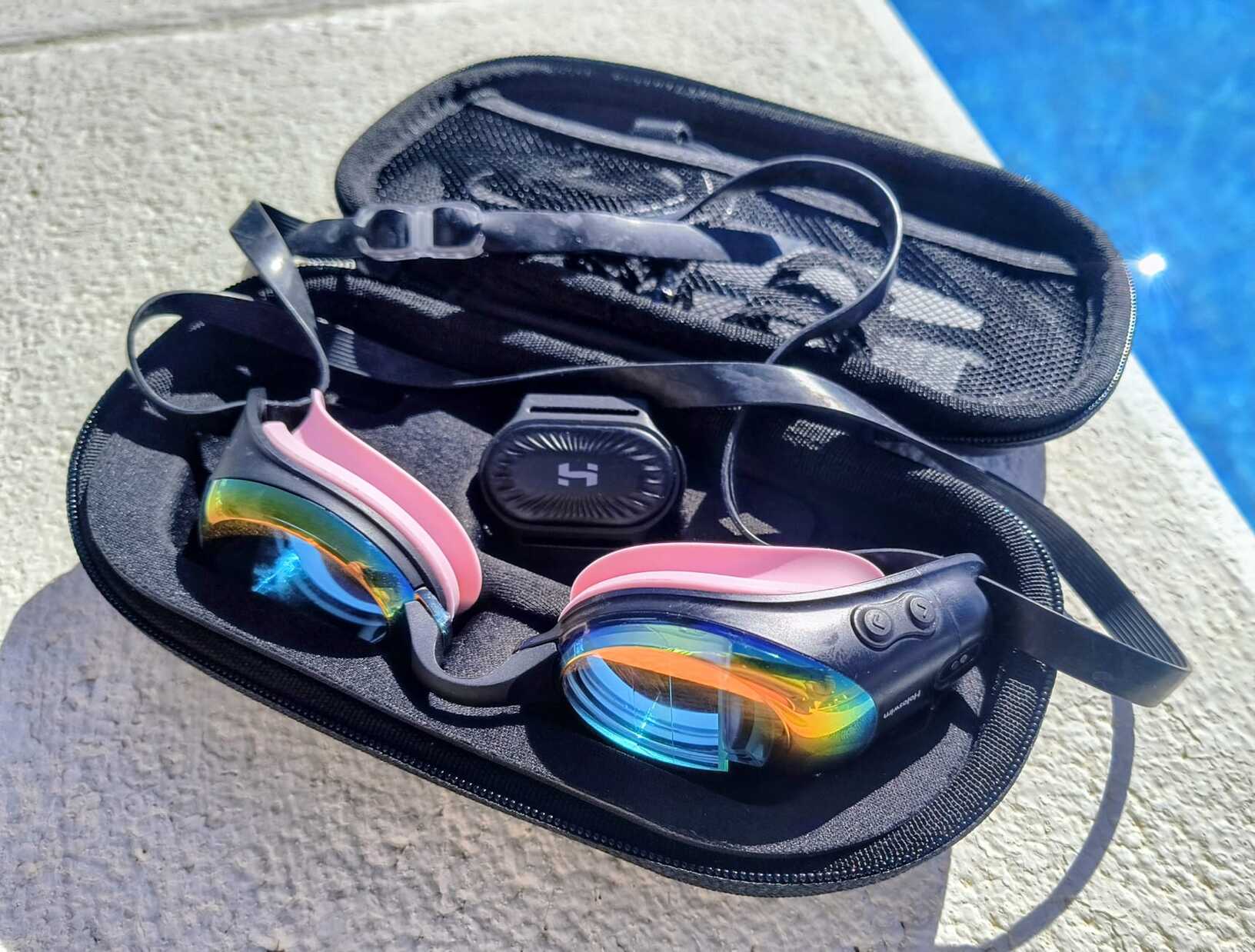
Holosport has done a good job here. The goggles have a smooth, streamlined profile, with no obvious external electronic blocks spoiling the styling.
The balance between the left and right goggles is also surprisingly good, considering that the additional electronics and buttons are positioned on the right-hand side. I was expecting them to feel a little lopsided, but that wasn't the case.
The menus are intuitive, too, and I found it straightforward to navigate the settings and customise the information displayed.
Of course, looking good on the poolside is one thing. Looking good while swimming is another, so the fit and display position are particularly important. More on that shortly!
Holoswim 3 Pro goggles sleek design
Get your FREE Open Water Swimming Sessions E-Book
What's Inside the Box?
I've put together a short unboxing video to show you exactly what you receive with the Holoswim 3 Pro.
It's a useful way to see the contents without me waffling on while unpacking things. You're welcome!
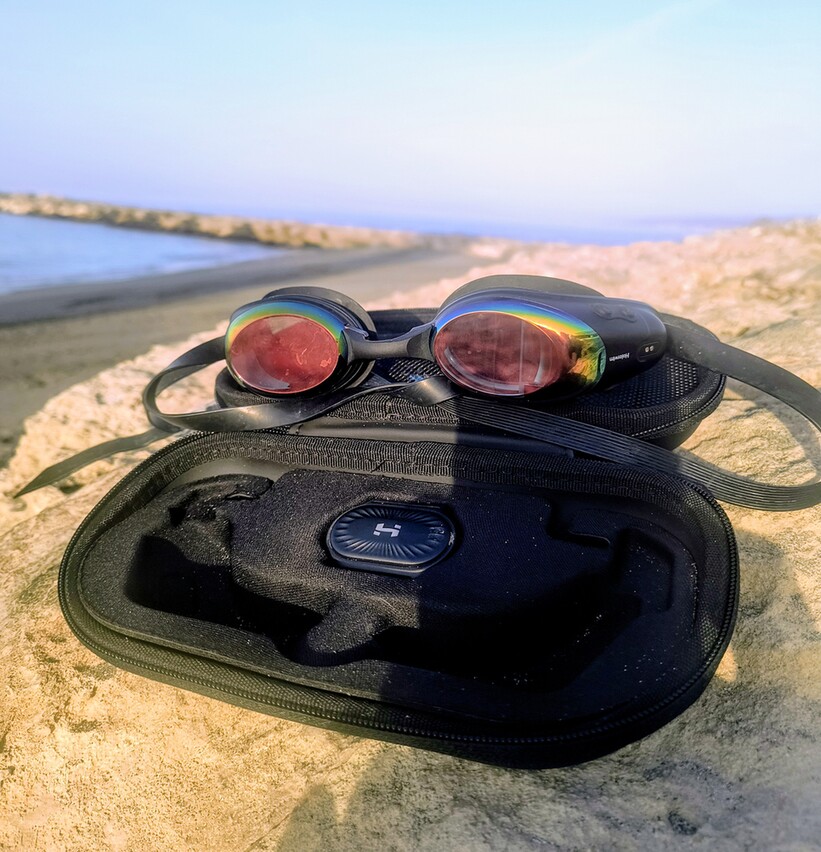
One detail I particularly liked was the design of the storage box. There's a dedicated recess for the HandPlus B2 heart-rate monitor, as well as room for a swimming hat, charging cable and interchangeable nose bridges.
Even better, the charging cable uses the same connection interface for both the goggles and the HandPlus B2.
This means you only need one cable to charge both devices.
That's a small but thoughtful detail. It's particularly useful if, like me, you're capable of misplacing a charging cable despite having a perfectly good storage box in which to keep it. As it happens, I've managed to lose the cable for my HandPlus B2, so this shared connection has proved rather convenient!
Holoswim 3 Pro Unboxing video by Chilitri
Pool Swimming: Your Data, Right in Front of You
The main attraction of smart swimming goggles is being able to see your training data in the Head Up Display (HUD) without stopping to look at your watch.
The Holoswim 3 Pro allows you to customise the information displayed, so you can choose the metrics that matter most to you.
For pool swimming, the available information includes:
- Time
- Distance
- Lap count
- Pace
- Stroke count
I particularly appreciated the ability to adjust the pool length in the app.
I have a small pool at home, so being able to configure the goggles to match its dimensions was important. There's little point having clever technology if it thinks you've completed a 25-metre length when you've actually swum considerably less!
My pool also has an Endless pool swim spa for coaching but sadly the goggles have no features to support this or tethered swimming.
Once configured, the goggles provide a convenient way to monitor your session without repeatedly checking your watch.
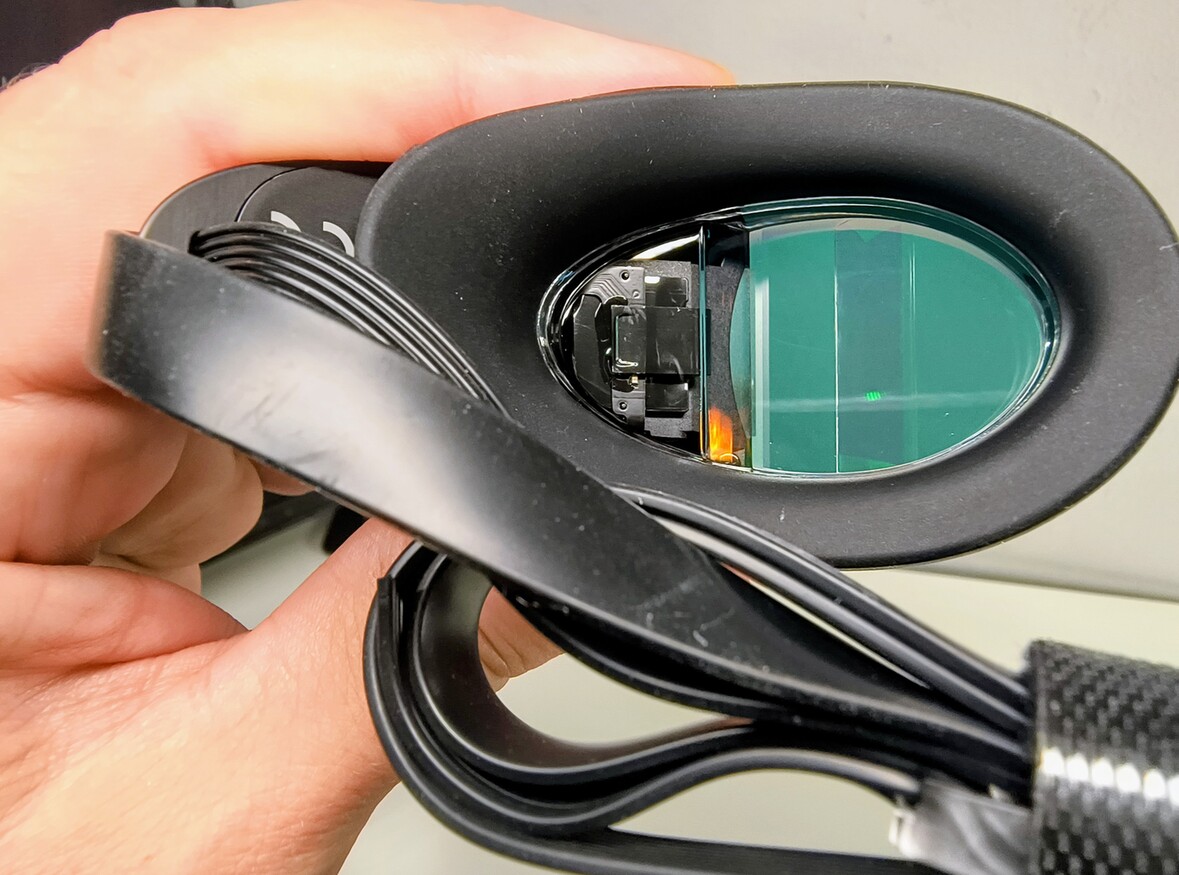
The anti-fog coating also performed well during my testing. I followed the instructions to wet the goggles before swimming, and the coating appeared to do its job.
As with any anti-fog treatment, I'd recommend following the manufacturer's care instructions rather than experimenting with cleaning products or rubbing the lenses.
Customising the Display on the Holoswim 3 Pro
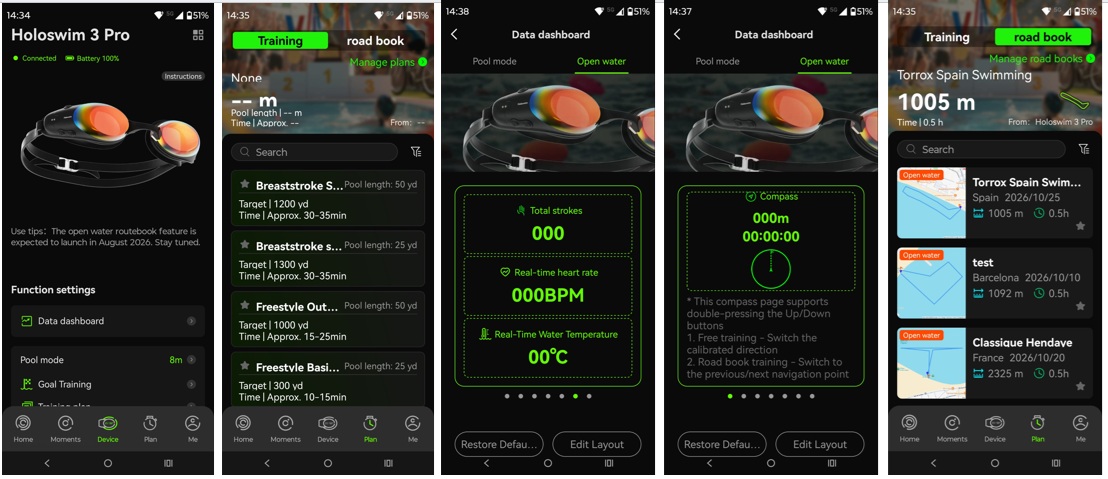
Another positive is the ability to customise the information shown in the display for both pool and open-water swimming.
This is useful because the information I want during a steady endurance session isn't necessarily the same as what I need during intervals.
As a coach, I like being able to keep the display focused on the metrics relevant to the session, rather than having a stream of numbers competing for my attention.
The aim is to make the data useful without turning every swim into an exercise in reading a miniature spreadsheet!
Open-Water Swimming: A Particularly Useful Feature
Where the Holoswim 3 Pro becomes especially interesting for triathletes is open-water swimming.
The goggles include GPS functionality, allowing you to access swimming data and navigation features while out in the water.
The open-water display can include:
- Time
- Distance
- Pace
- Direction
- Water temperature
- Water depth
- GPS navigation
For anyone training for a triathlon, being able to monitor distance and pace while swimming outdoors is useful. It can help you judge your effort; understand how far you've travelled and keep track of your session without relying entirely on a watch.
The direction and navigation features are particularly appealing if you regularly swim in unfamiliar locations or want to practise swimming a specific route.
Naturally, GPS accuracy can be affected by the environment and satellite reception, so I wouldn't treat every displayed distance as an absolute measurement. However, having this information available directly in your goggles is a useful addition to the open-water swimmer's toolkit.
The Roadbook Feature in the Holoswim App
One of my favourite features is the Roadbook function.
You can use routes supplied by other swimmers or create your own open-water route.
I found creating a route straightforward. This means you can plan a swim that matches the distance you need for a particular training session rather than simply heading out and hoping you've swum far enough.
You can also explore routes uploaded by other users in your area, which could be useful when visiting a new location.
For triathletes preparing for an event, this opens up some interesting possibilities. You could create a route that reflects your intended training distance, practise navigation and become more comfortable swimming a set distance in open water.
As someone who coaches open-water swimming in southern Spain, I can see the appeal of being able to plan a session before getting into the sea.
Just remember that a GPS route is a training aid, not a replacement for open-water safety procedures, local knowledge or awareness of conditions. Plus, you will need to sight every few strokes to understand if you are near anything dangerous like a jet ski! You can’t just rely on the compass to guide you even if it is tempting.
Holosport App Screen shots showing the Holoswim 3 Pro features
Get your FREE Open Water Swimming Sessions E-Book
Heart-Rate Monitoring: A Useful Addition, with a Caveat
The Holoswim 3 Pro supports heart-rate data when paired with the Holosport HandPlus B2 heart-rate monitor, which I reviewed separately.
For athletes who train using heart-rate zones, this is potentially a valuable feature.
Heart rate can provide another way to assess training intensity, particularly during aerobic endurance sessions. Combined with pace, distance and your perceived effort, it can help you understand how your body is responding to the session.
However, my experience with the connection was mixed.
I tested the goggles with the HandPlus B2 positioned on both my upper arm and lower arm which was for me the natural place to put it. Unfortunately, the connection kept dropping out in both positions. The connection is Bluetooth and as we know Bluetooth does not like water!
I had much better results when positioning the monitor underneath my swimming hat.
That suggests the positioning of the sensor is important – so my advice is to always put it under your swim hat.
I'd like to see a more reliable experience when wearing the monitor on the arm, as this would be a convenient option for many athletes – especially if doing a Brick session (swim to bike).
If heart-rate-guided training is important to you, it's worth considering this practical limitation alongside the benefits of having heart rate displayed in your goggles.
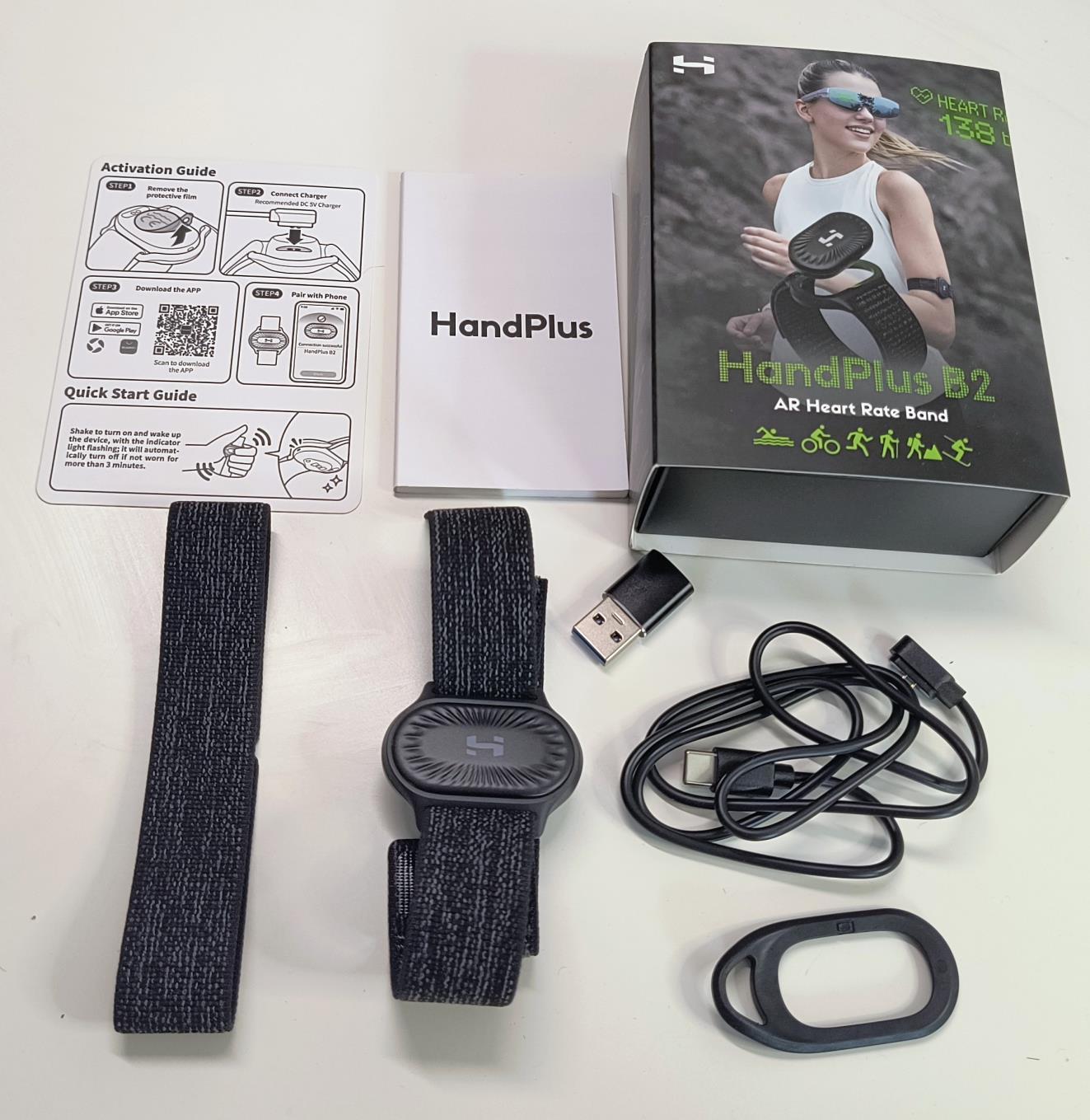
The Holosport HandPlus B2 Heart Rate Monitor
Get your FREE Swim Workouts for Triathletes E-book
Structured Swimming Workouts: A Promising Feature that Needs More Development
This was the feature I was most excited to explore.
Holosport has introduced support for structured swimming plans, which is a positive development. As a coach, I want technology to help athletes follow their sessions accurately, rather than simply display data after they've finished.
However, the current workout functionality feels rather basic.
The available sessions I explored were very simple, with no clear provision for specifying rest intervals, effort targets or heart-rate targets.
I found this disappointing, particularly because the goggles can display heart rate when paired with the HandPlus B2.
Surely, if we're going to combine heart-rate monitoring with structured workouts, we should be able to specify a target heart-rate zone for a particular interval?
Creating Your Own Sessions in the Holoswim App
Holosport advised me that I could create my own swimming sessions because I was disappointed with the standard library.
This is useful, but there are limitations.
The workout builder allows you to work with time targets and add a break time to each interval. However, I couldn't add heart-rate targets, RPE (rating of perceived exertion) targets or swimming drills.
For example, as a coach, I might prescribe:
- 10 minutes of easy swimming to warm up.
- 6 × 100 metres at a controlled aerobic effort.
- 20 seconds' recovery between repetitions.
- A specific heart-rate range or RPE target.
- A technique drill or two to address a particular aspect of the swimmer's stroke.
This type of session structure is central to how many triathletes train.
Being able to follow the timings is helpful, but without the ability to include effort targets and drills, the workout builder doesn't yet offer the flexibility I'd want for more detailed coaching sessions.
My Verdict on Holoswim Structured Workouts?
It's a welcome step in the right direction, but I think there's plenty of room for improvement.
I'd love to see more sophisticated workout building, including pace-based intervals, rest periods, heart-rate zones goals, RPE targets and technique drills.
For athletes following a coach-prescribed programme, these additions would make the goggles considerably more useful.
The Fit of the Holoswim 3 Pro: My Biggest Frustration
Unfortunately, not everything went smoothly.
When I first received the goggles, I struggled to position the display comfortably within my field of vision.
I tried all the supplied nose bridges, but I couldn't get the display into the right position without making the goggles very loose.
My suspicion is that the curvature of my face affects how the goggles sit, causing the display to move out of my natural field of vision.
I fed this back to Holosport, and they kindly sent me replacement rubber eye seals. These did help to some extent, but I still needed to wear the goggles more loosely than I'd normally choose.
The downside? Water occasionally finds its way inside.
That's not ideal when you're trying to concentrate on your swimming rather than wondering whether your next push-off is going to involve clearing water from your goggles.
I appreciate that fit is highly individual, and what works for my face won't necessarily be a problem for someone else. Holosport was also responsive when I raised the issue, which I appreciated.
Nevertheless, it's an important consideration.
A heads-up display is only useful if you can see it comfortably while swimming. I'd recommend paying particular attention to the fit and display position when trying these goggles for the first time.
If possible, check that you can see the display clearly while maintaining a secure, comfortable seal before committing to a long session.
Holoswim Stroke Detection: A Little Confused!
There's one other small issue worth mentioning.
I swim front crawl exclusively, but the goggles recorded my swims as breaststroke the majority of the time.
Now, I'm always happy to learn a new swimming skill, but I'm fairly confident I haven't been secretly practising breaststroke during my front-crawl sessions!
This wasn't the biggest issue I encountered, but accurate stroke detection is an important part of tracking swimming performance.
I'd like to see this improved through future software updates.
The Holoswim App and Connectivity: No Subscription is a Big Plus
One of the strongest selling points of the Holoswim 3 Pro is its free app.
There is no mandatory subscription to access the app's core functionality, which is a refreshing approach in a world where more and more sports technology seems to come with a monthly bill.
You purchase the goggles, use the app and access the supported features without paying an ongoing subscription fee.
For athletes who want real-time swimming metrics and GPS navigation without another recurring expense, this is a significant advantage.
However, there are some limitations when it comes to integrating your training data with other platforms.
TrainingPeaks and Final Surge
At the moment, I couldn't find a way to send workouts directly from TrainingPeaks to the goggles.
Similarly, I couldn't send a completed swim directly to TrainingPeaks or Final Surge.
The app supports sharing activities to Strava, which provides a possible workaround, but it's not the seamless integration I'd like to see.
There is also currently no option to download a FIT file for the swim.
As I use TrainingPeaks and Final Surge to manage my athletes training, I want their completed sessions to appear in the platforms where I review their training load and monitor progress.
My workaround is straightforward: I continue to record my swims using my COROS PACE 3 watch. This automatically syncs the session to my training platforms.
It means I can enjoy the in-goggle display while swimming and still retain my usual training records.
However, it does mean recording the session twice, which rather defeats some of the convenience of connected sports technology.
For athletes who rely on TrainingPeaks, Final Surge or another training platform, I'd check the current integration options before making a purchase.
Direct workout imports and activity exports would be valuable improvements for future versions of the app.
Holoswim 3 Pro vs FORM Smart Swim: Which Makes More Sense?
The Holoswim 3 Pro isn't the only option for swimmers who want real-time data in their goggles.
The FORM Smart Swim range is another established option, and the differences become particularly interesting when we consider the price and subscription model.
The following comparison uses the euro prices you've supplied for the Holoswim and HandPlus B2, alongside FORM's European product pricing. Prices and subscription terms can change, so it's worth checking the current offers before purchasing.
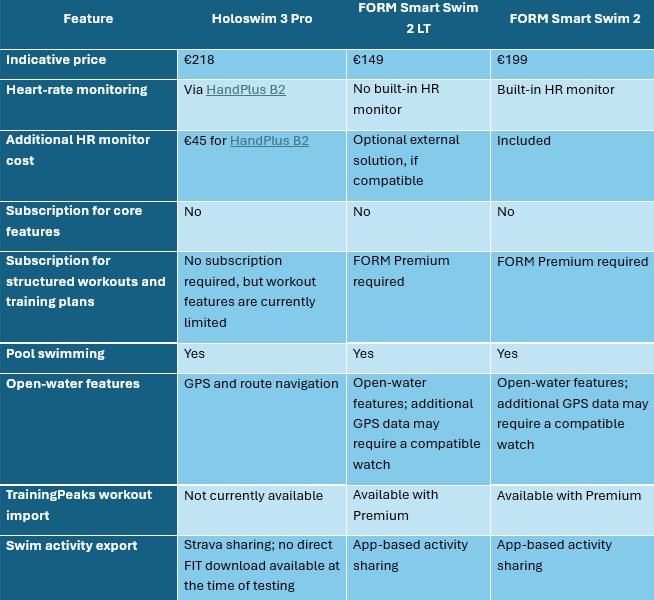
Feature comparison based on my Holoswim testing and the manufacturers' published information. Check the current specifications and compatibility requirements before buying.
FORM Smart Swim 2 LT: Lower Initial Cost, But Consider The Subscription
At €149, the FORM Smart Swim 2 LT is the cheaper entry point.
It provides real-time swimming metrics, customisable displays, stroke detection and post-swim analysis without requiring an ongoing subscription for its core features.
However, if you want the more advanced training functionality, you'll need FORM Premium.
This unlocks features such as structured workouts, personalised training plans, the workout builder and TrainingPeaks workout imports. FORM's European pricing has listed an annual Premium subscription at €99, although you should confirm the current price before purchasing.
That changes the overall cost considerably.
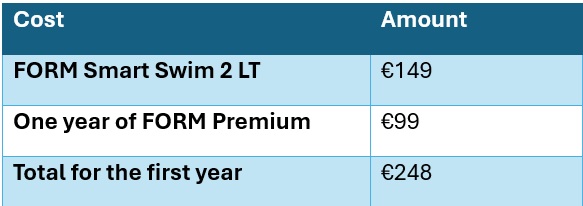
The important point is that you don't need Premium simply to use the goggles. The subscription is for the additional training and coaching features.
In my experience, FORM's swimming sessions are very good. The ability to follow structured workouts, including more detailed intervals, is a real advantage for athletes who want their goggles to guide them through a coach-prescribed session.
If you want that level of structure and use TrainingPeaks, FORM has a clear advantage over the current Holoswim workout functionality.
FORM Smart Swim 2: Built-In Heart Rate
The FORM Smart Swim 2 is another option at an indicative price of €199.
Its key advantage over the LT model is the integrated heart-rate monitor. You don't need to purchase a separate HandPlus B2 to access heart-rate data.
Compared with the Holoswim 3 Pro and HandPlus B2 combination, the price difference is relatively small.
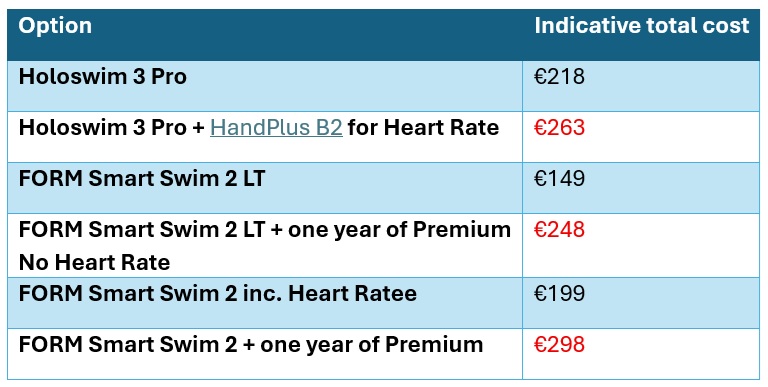
These totals use the prices above and exclude any discounts, delivery charges or future subscription-price changes.
The comparison isn't entirely about price, though. The goggles differ in their GPS arrangements, navigation features, heart-rate hardware and software ecosystems.
For example, the Holoswim 3 Pro's built-in GPS and Roadbook route functionality are attractive if you regularly swim outdoors and want navigation features without relying on a compatible watch.
FORM, on the other hand, has a more developed structured-workout experience, including TrainingPeaks workout imports with Premium.
Which Would I Choose?
It depends on how you swim and what you expect from your goggles.
I'd lean towards the Holoswim 3 Pro if:
- You want GPS and route navigation built into your open-water swimming experience.
- You want to avoid an ongoing subscription.
- You value customisable pool and open-water metrics.
- You're happy to manage your training sessions separately using a sports watch or another platform.
I'd lean towards FORM if:
- You want more advanced structured swimming sessions.
- You regularly follow a coach-prescribed workout.
- You want to import workouts from TrainingPeaks.
- You value built-in heart-rate monitoring and prefer not to use a separate sensor, particularly with the Smart Swim 2.
For me, the biggest difference isn't the display itself. It's what happens before and after the swim.
The Holoswim offers some very attractive hardware features, particularly for open-water swimmers. FORM currently has the stronger structured-training experience.
And as a coach, I want smart swimming goggles to do more than show me how far I've swum. I want them to help me execute the session I've planned.
Final Verdict: Plenty of Potential, but a Few Things to Iron Out
The Holoswim 3 Pro has several features I genuinely like.
The styling is good, the goggles feel well balanced, and the menus are intuitive. I particularly appreciate the ability to customise the display for pool and open-water swimming, adjust the pool length and create or follow GPS routes through the Roadbook feature.
The free app is another major positive. Not having to pay a subscription to access the core features makes the goggles an attractive option for athletes who want to keep their sports technology costs under control. I hope they keep this going and not move to a subscription model. I also hope they continue to upgrade the features – especially the workout builder.
The anti-fog coating also performed well during my testing, and the shared charging connection for the goggles and HandPlus B2 is a thoughtful touch.
However, my experience hasn't been entirely straightforward.
The fit has been my biggest personal frustration. Despite trying the different nose bridges and replacement eye seals, I still need to wear the goggles more loosely than I'd like, and this sometimes allows water to enter.
The heart-rate connection was also unreliable when I wore the HandPlus B2 on my arm, although positioning it under my swimming hat worked much better.
Finally, the structured workout functionality needs further development. I'd like to see support for heart rate and RPE targets, technique drills, more sophisticated intervals and direct integration with platforms such as TrainingPeaks.
Accurate stroke detection and better activity-export options would also be welcome.
Who are the Holoswim 3 Pro Best Suited To?
I'd particularly recommend considering them if you're a recreational swimmer or triathlete who wants real-time swimming data, enjoys open-water swimming and likes the idea of GPS navigation without paying a recurring subscription.
If you're a data-driven athlete who follows a detailed training plan, though, I'd look carefully at the workout-building and connectivity limitations before making a decision.
Get your FREE Open Water Swimming Sessions E-Book
Conclusion: My Overall View of the Holoswim Pro Goggles?
The Holoswim 3 Pro is an interesting piece of swimming technology with some genuinely useful features. The open-water functionality and subscription-free app are appealing, but the fit and training software need more work to make these goggles an easy recommendation for every swimmer.
I'll be interested to see how the software develops. With better workout customisation, improved integration with training platforms and a more consistent fit across different face shapes, the Holoswim 3 Pro could become a much stronger contender in the smart-swimming market.
For now, they're a promising option, particularly for open-water swimmers, but not quite the complete coaching companion I'd hoped for.
HandPlus H2 Heart Rate Monitor website link.
Get 10% off with code CHILITRI
Karen Parnell is a Level 3 British Triathlon and IRONMAN Certified Coach, 8020 Endurance Certified Coach, WOWSA Level 3 open water swimming coach and NASM Personal Trainer and Sports Technology Writer.
Karen has recently completed a postgraduate MSc in Sports Performance Coaching at the University of Stirling.
Need a training plan? I have plans on TrainingPeaks and FinalSurge:
I also coach a very small number of athletes one to one for all triathlon and multi-sport distances, open water swimming events and running races, email me for details and availability. Karen.parnell@chilitri.com
Get your FREE Guide to Running Speed and Technique
Get your FREE Swim Workouts for Triathletes E-book
Get your FREE Open Water Swimming Sessions E-Book
Get your FREE 8-Week Sprint Triathlon Swimming Training Plan
Holoswim 3 Pro Review - Frequently Asked Questions (FAQ)
Are the Holoswim 3 Pro goggles worth buying?
The Holoswim 3 Pro offers some appealing features, particularly for open-water swimmers. The built-in GPS, route navigation, customisable display and subscription-free app are all positives. However, the limited structured workout functionality and my personal experience with the fit mean they're not the perfect choice for everyone. If you want detailed, coach-led workouts displayed in your goggles, compare the available features with FORM before making a decision.
Can you use the Holoswim 3 Pro in both the pool and open water?
Yes. The goggles support both pool and open-water swimming. Pool features include time, distance, lap count, pace and stroke count, while open-water features include GPS navigation, distance, pace, direction and water temperature. You can customise the information displayed to suit your swimming environment.
Do the Holoswim 3 Pro require a subscription?
No. The Holoswim app is free to use, with no mandatory subscription for its supported features. This is a significant advantage if you'd prefer not to pay an ongoing fee to access your swimming data.
Can the Holoswim 3 Pro display heart rate?
Yes, when paired with the Holosport HandPlus B2 heart-rate monitor. However, during my testing, I experienced connection dropouts when wearing the monitor on my upper or lower arm. Positioning it under my swimming hat gave me better results.
Can you follow structured swimming workouts with the Holoswim 3 Pro?
The goggles support structured swimming sessions, and you can create your own workouts using time targets and break times. However, the workout builder currently has limitations. I couldn't add heart-rate or RPE targets or swimming drills, which makes it less suitable for following detailed, coach-prescribed sessions.
Can you send TrainingPeaks workouts to the Holoswim 3 Pro?
At the time of my review, I couldn't send workouts directly from TrainingPeaks to the goggles. Completed swims also couldn't be exported directly to TrainingPeaks using a downloadable FIT file. Sharing through Strava may provide a workaround, but I continued recording my swims with my COROS PACE 3 to ensure they synced automatically to TrainingPeaks and Final Surge.
Are the Holoswim 3 Pro suitable for open-water triathlon training?
They have several useful features for triathletes, including GPS navigation, distance and pace information, and the ability to create or follow routes using the Roadbook feature. These can help you plan training swims and practise navigation. As always, the goggles should complement, rather than replace, appropriate open-water safety measures.
Can you adjust the pool length on the Holoswim 3 Pro?
Yes. You can adjust the pool length in the app, which is particularly useful if you swim in a non-standard pool. I was able to configure the goggles for my small home pool.
Do the Holoswim 3 Pro goggles fog up?
I found that the anti-fog coating worked well during my testing, provided I followed the manufacturer's instructions and wetted the goggles before swimming. Results can vary depending on use and care, so follow the supplied guidance to get the best performance.
Are the Holoswim 3 Pro better than FORM smart swimming goggles?
That depends on your priorities. The Holoswim 3 Pro is appealing if you want GPS navigation and core features without a subscription. FORM has a more developed structured-workout experience, with access to advanced training features and TrainingPeaks workout imports through its Premium subscription. Compare the total cost, features and subscription requirements before deciding which suits your training best.